Configure once, apply to a thousand machines
Build a policy with the checks and tasks a kind of machine needs and apply it to a company, a site or a department. Every machine inherits everything, including the ones that join tomorrow. When something leaves the normal range you get a single alert, which closes itself when the problem passes.
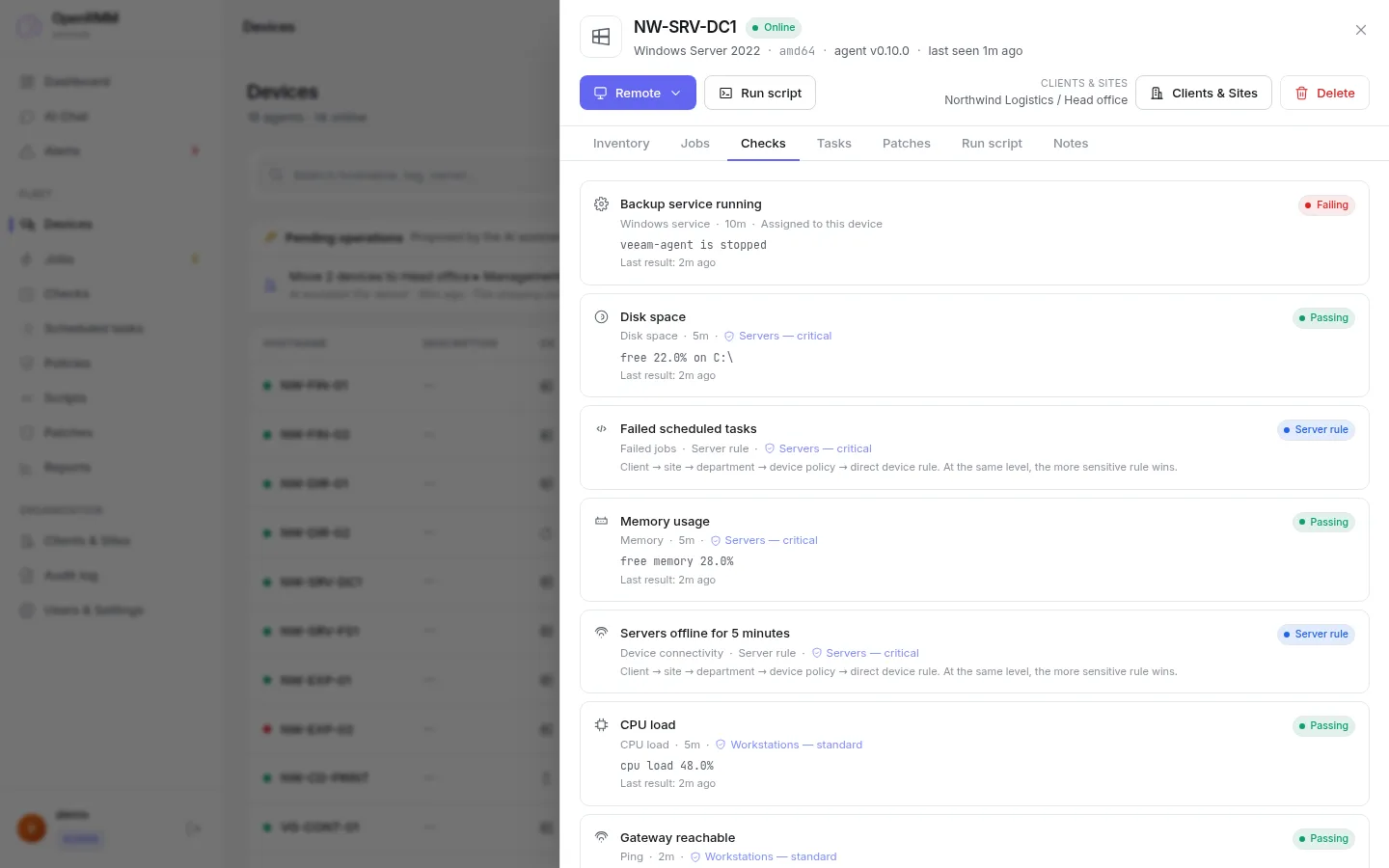
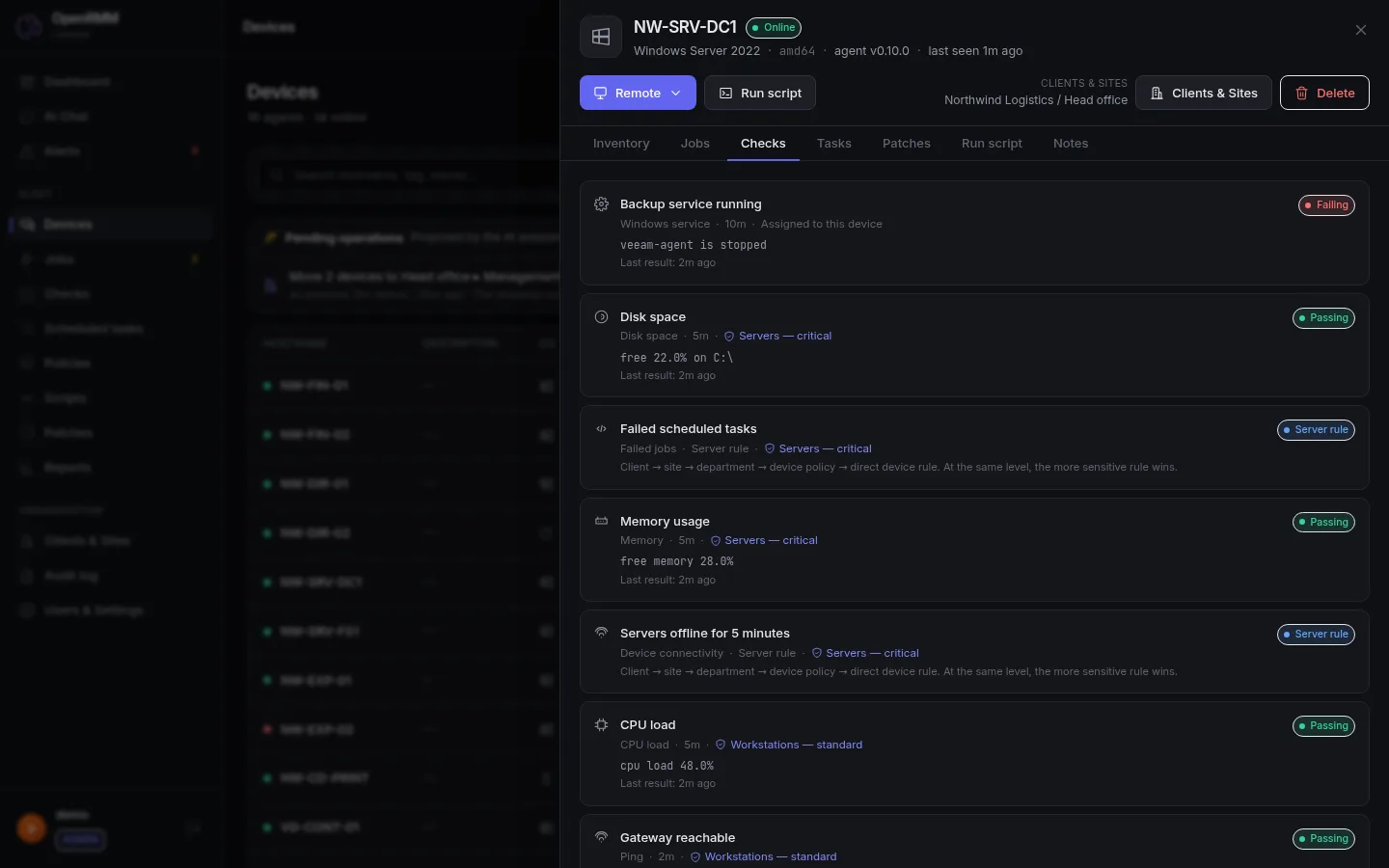
Each machine adds up the policies above it
A machine receives every policy that covers it: the company's, the site's, the department's and its own. Change a policy and it changes on all machines at once.
Illustrative example.
- CompanyNorthwind"Base" policy: disk space, memory and the antivirus service
- SiteHeadquarters"Servers" policy: CPU and gateway ping
- DepartmentFinance"ERP" policy: a daily task that validates the ERP backup
- MachineNW-SRV-FIN01Receives the three policies above, plus a check of its own
Checks, tasks and patch rules
Checks
Disk, memory, CPU, ping, Windows services and your own scripts, each with warning and error thresholds and the interval you choose.
Scheduled tasks
Run a library script or one of your own on an interval, every day or on weekdays, at several times.
Patch policies
Maintenance windows, automatic approval by classification after a few days, exclusions and a restart rule. See patches
- Edit in place: turn a check or a task on or off inside the policy, without redoing the assignments.
- Run now: trigger a task on all of its machines. The ones that are offline get it when they return.
- A missed time is recovered on the scheduler's next cycle.
- On the machine's page you see what is its own and what came from each policy.
Ask for the policy in plain language
"Create a policy for Northwind's servers with a disk check at 85% and a gateway ping." The AI builds the proposal, but it only takes effect after it has been reviewed.
- Policies, checks and tasks proposed by the AI are created disabled and marked as an "AI proposal".
- Only administrators without a scope restriction can receive policy proposals.
- Whoever enables one is recorded. The database refuses to enable a proposal nobody reviewed.
Six types that cover the day to day
| Check | What it measures | When it alerts |
|---|---|---|
| Disk space | % free on a path | Below the warning or error threshold |
| Memory | % of free memory | Below the threshold |
| CPU | % in use | Above the threshold |
| Ping | Whether a host responds | When it does not respond |
| Windows service | A service's state | When it is not running |
| Script | The exit code of a script of yours | 0 passes, 1 is a warning, anything else is a failure |
A CPU spike wakes nobody up
Every check has flap control, with defaults you can adjust.
From warning to resolution, with history
One alert per problem
At most one open alert per condition, with an occurrence count and the first and last time seen.
Closes itself
When the check recovers or the machine returns. A machine silent for more than 3 minutes becomes an offline alert.
Acknowledge or resolve
Who acknowledged or resolved it, how and when is recorded on a timeline for each alert.
Silence and maintenance
Silence windows stop the emails, with the reason and author recorded, without deleting the alert or turning off the check.
Email notification
Each technician chooses what they want to receive. Emails go through a queue with retries.
Bulk actions
Acknowledge or resolve several alerts at once, without overwriting another technician's work.
Good to know
- Today alert notifications are by email. Other channels are not documented yet.
- The 3-minute limit for treating a machine as offline is fixed.
- Alerts and check results are kept for 90 days, adjustable when self-hosted.

See the demo's policies in action.
The demo has policies, inherited checks and open alerts ready to explore.